Vivo X80 Pro review

The Vivo X80 Pro, although not a pro, comes equipped with great camera and features, but is still not in the premium category
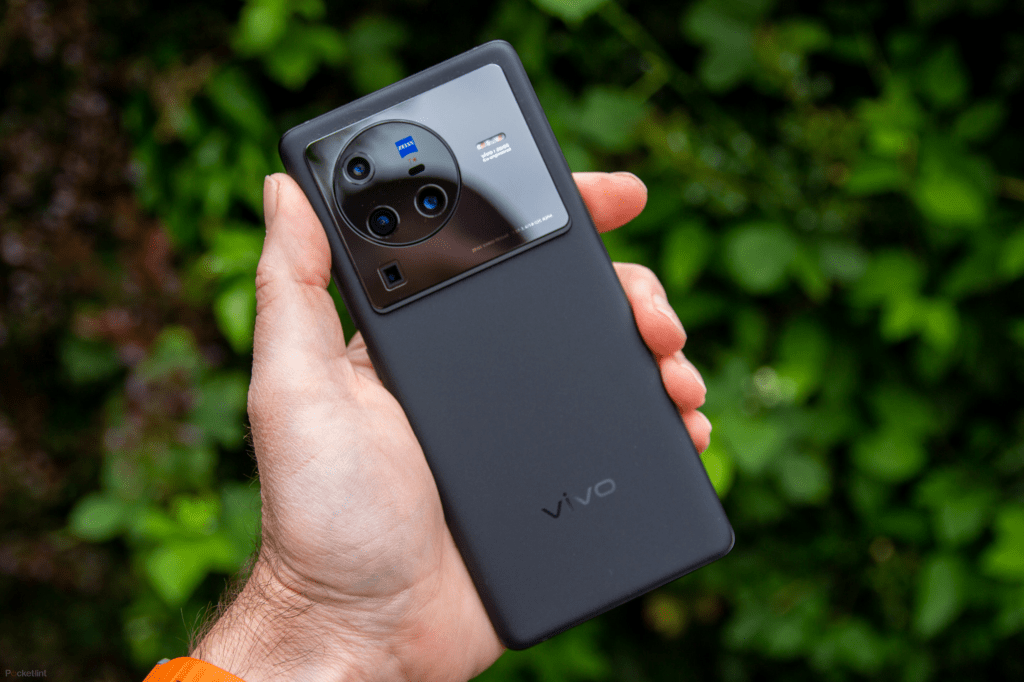
What we understand by pro has become so convoluted in tech jargon that everything has just become pro. Any flagship comes with a pro suffix attached, whether it justifies the features or not. And, over the last five or so years, it has become one of the most overused terms. Vivo, like many others, does not do justice to the pro name with its new iteration the X80 pro. The phone does come equipped with more feature than its other categories, but it does not justify the pro tag. But then what you and I understand as pro, can be very subjective.

  • Design

The first thing which will attract a person towards this device is the camera bump. Occupying nearly a third of the space, the phone has a distinct look to it. The feel of the back panel is good, and the back cover with its textured finish gives it a premium look. Though a bit wobbly, the phone doesn’t skid on surfaces. The volume and power buttons on the side are just about right for easy access and the front has a hole-punch camera. Ergonomically, though, there are problems. The phone weighs too much and isn’t as well balanced as you would like to be.

ALSO READ : Vivo tws 2 anc earbuds review

  • Screen

This is where Vivo has really outdone itself. With peak brightness at 1,500 nits, Vivo doesn’t disappoint. The 6.8-inch screen offers excellent viewing angles and perfect blacks. Even in the sun, the screen performs well. And, in low light modes, it shines. For movie watching, Vivo would have been ideal, had it not been for its weight. The refresh rate, though 120Hz, was not as smooth as you would expect in a Samsung. The curve edges are also something I am not a big fan of.

The bezels are barely noticeable and like with most phones the hole-punch camera becomes invisible after a while. One problem, which has been very common across platforms, was the night light feature. Even with warm temperatures, it was very luminescent for my comfort.

  • Camera

Another area where Vivo has done exceedingly well is the camera setup. With high pixel density lenses at the back and the 32-MP lens at the front, the camera setup is one of the best in the category. The telephoto lens worked well and there were hardly any issues with pixelations. Vivo provides a few standard beautification modes, which when switched off provide a vivid and clear picture. The colours are as close to likeness as possible and with Zeiss mode on, the phone performs even better with clearer colours. The video recording feature is still not as good as others in the category. The cinematic mode offered more, but still fell short of expectation.

  • Battery life

The 4700mAh battery provided enough juice for the phone to survive over 14 hours even with medium to heavy use and GPS, but it was not a two-day battery life one would expect. With light and medium use the battery can run 18 hours, but that would be too much of a stretch. But the battery drain was not as bad as other Snapdragon 8 Gen 1 processors.

  • Performance and UX

Vivo has been able to solve the heating issues related with the Snapdragon chips to a certain extent. The phone does start heating up after 45 minutes of gameplay. Regular functions, though, did not subject it to heating issues. Performance wise, the phone was not up to the mark. The bloatware was a big problem. Despite the 12 GB RAM and extra clocking speed, the phone did not perform well at its peak. The OS is complicated and not an easy one to navigate. Vivo needs better OS at top of the line up.

  • Price

Imagine purchasing a Rs 80,000 phone and spending a day deleting all the apps you do not need and then having to deal with too much of native apps. When a person is paying that much, they would like a clean interface and that is what Vivo has not been able to provide. To break the premium market, it would need a strong key differentiator.


Get your Aadhaar, PAN delivered on WhatsApp using Digilocker: Here’s how

Digilocker is a new addition to the services available through MyGov HelpDesk chatbot on WhatsApp and you can use it to access CoWin services like vaccine appointment, vaccination certificate etc. too

Digilocker services are now available on WhatsApp through MyGov Helpdesk chatbot. For the uninitiated, Digilocker is a smartphone app developed by the Ministry of Electronics & IT (MeitY) with an aim to provide access to authentic documents in digital form to the citizens. The issued documents on the Digilocker platform are deemed to be at par with original physical documents as per Rule 9A of the Information Technology (Preservation and Retention of Information by Intermediaries providing Digital Locker facilities) Rules, 2016 notified on February 8, 2017.

“Offering Digilocker services on the MyGov Helpdesk is a natural progression and a step towards providing citizens with simplified access to essential services via WhatsApp’s easy and accessible platform. With almost 100 million plus people already registered on Digilocker and 5 billion plus documents issued till date, we are confident that the service on WhatsApp will digitally empower millions by helping them access authentic documents and information, right from within their phones,” MyGov CEO, Abhishek Singh, said.

Here is how-to access Digilocker services via MyGov Helpdesk chatbot on WhatsApp:

  • Step 1: Save ‘+91-9013151515’ as a MyGov HelpDesk contact number in the phone directory
  • Step 2: Open WhatsApp and refresh list of contacts
  • Step 3: Tap on MyGov HelpDesk to open the chat window
  • Step 4: Type ‘Namaste’, ‘Hi’ or ‘Digilocker’ to activate the chatbot
  • Step 5: The chatbot shows available options. Tap on the ‘Digilocker Services’ here
  • Step 6: Tap on ‘Yes’ option when the chatbot asks if you have Digilocker account
  • Step 7: Enter 12-digit Aadhaar number when the chatbot asks for it. It is required to link and authenticate your Digilocker account for access to its services via WhatsApp
  • Step 8: Enter the OTP to proceed
  • Step 9: Once the OTP is confirmed, the chatbot lists all the documents linked with your Digilocker account.However, you can download only one document at a time. To download, type and send the number the document is listed at
  • Step 10: Tap on other documents to go back to the list of available documents

Digilocker is a new addition to the services available through MyGov HelpDesk chatbot on WhatsApp. You can also access CoWin services such as vaccine certificates through the same chatbot. To do so, follow the following steps:

  • Step 1: Open WhatsApp and say “Hi” on the MyGov HelpDesk chatbot
  • Step 2: Tap on CoWin Services from the options
  • Step 3: The bot displays list of available services. Currently, the vaccine related services such as appointment, certificate, etc. are listed as option 2. Type ‘2’ and send
  • Step 4: To download vaccine certificate, type ‘2’ and send
  • Step 5: Authenticate through OTP details
  • Step 6: Once you enter the OTP, the bot displays the names of individuals registered on the CoWIN website with the number
  • Step 7: Type the number the user is listed at and send to download certificate. The bot will then send the vaccine certificate on WhatsApp in a PDF format.

Vivo TWS 2 ANC earbuds review

The only thing the Vivo TWS 2 ANC have going for them is the battery life and nothing else. Sound signatures are disappointing

There has been a flood of wireless earphones in the market. All the major brands have been launching their earbuds and making a foray into the space. Although Vivo had introduced their buds two years ago, they have recently launched a new iteration with ANC feature. The TWS 2 ANC are not the only ones with active noise cancellation, they are tracking to create a niche in the market, which has few players.

ALSO READ – Micromax in 2c review

  • Design

The company has kept to the design, with a few changes. The Apple-like plasticky-end has given way for buds which are replaceable and more customisable. The feature does help with better fit, but the buds are still bulky in design and too visible for my taste. The box has the same curvy edges. Although one would have liked to see a sleeker design, even at this size it does not seem too much of a burden. The plastic feel is better than competitors certainly.

  • Sound

Given the price range, the Vivo buds are a disappointment in this category. The sound signatures were poor across when compared to others. The volume levels were low. At highs, there is a lot of throttling, and the lows are not audible at all. I could not hear the starting of Kygo’s “Firestone”. The bass was very low. In mid-frequencies, the earphones performed better. The ANC did create a vacuum but did not work as well as you would expect the ANC to work. There was a lot of pass-through. The mic’s weren’t as good either, as there was a lot of ambient noise that they captured.

  • Connectivity and battery

The Bluetooth range is not an issue, but even with Vivo phones there was a lag in connectivity. The earphones would falter often, not connecting to the phone immediately. The earphones would work well for 4-5 hours, but wearability is an issue. The company promises over a day’s battery life, but the actual situation may be much lower.

  • Price

At Rs 5,999, Vivo TWC ANC 2 are a tad bit expensive for what they bring to the table. Vivo is still far from perfection when it comes to developing the perfect buds.

Micromax In 2C review

With 3GB RAM and 32GB on-board storage, mediocre camera performance, and UNISOC T610 processor, the Micromax’s In 2C can be an option only for light users

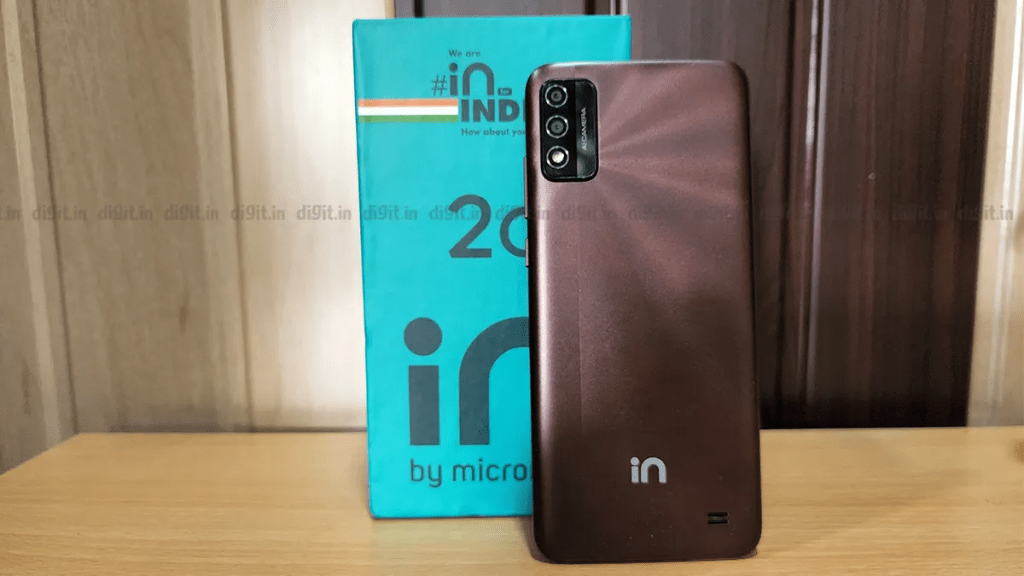
Home-grown electronics maker Micromax recently launched in India the Micromax In 2C. Priced at Rs 7,499, the smartphone fares well for basic operations such as calls, messages, web browsing, and streaming multimedia content, but lacks in terms of camera — a major feature for a smartphone buyer.

  • Camera

The Micromax In 2C sports a dual-camera array on the back — an 8-megapixel primary sensor paired with a 2MP depth sensor. On the front, there is a 5MP camera sensor. Details aside, the cameras’ performance is underwhelming and could have been better, especially for low light shots, which lack clarity. Using flash for indoor shots helped in getting a better shot, but overall imaging in low light was poor. Selfies also have the same issue, as the images appear blurry in dim light conditions.

For the outdoor shots, though better in comparison, the images lack sharpness. The other downsides are that the focus function fails to capture finer details in a frame and the colour contrast is slightly higher making the photos seem filtered.

The phone supports 1080p resolution video recording but the output comes out pixelated and seems to be an artificially upscaled version of 720p. Moreover, the cameras struggle in fixing focus several. The overall experience with the camera does not fare well compared to other budget phones in the same category.

Also read: Realme GT Neo 3 5G review

  • Design

The phone has a simple design with the power button and volume rocker placed on the right side of the frame. The positioning of the buttons is such that it is convenient for single-handed operation. The phone weighs 198 grams, though seen as heavy for some users it feels well balanced. It lacks a fingerprint scanner, so there is no sensor placed at the back like its predecessor In 2B. Though the camera bump on the back makes the phone wobble when placed on a flat surface, it does not slip. The phone has a mono speaker on the back. On the left side of the phone are the SIM and microSD card slots. It is a dualSIM phone with a dedicated slot for a microSD card for storage expansion.

  • Display

The Micromax In 2C sports a 6.52-inch HD+ display. The display is supported by an ambient light sensor, which auto sets the brightness based on lighting conditions. The adaptive brightness setting allows one to comfortably read in both sunlight and dimly lit indoor spaces. To minimise eye fatigue, especially during nighttime use, the phone has a night light mode that reduces the blue glare and gives the screen a neat tint, making it easier to read. The colours on the screen even when viewed from different angles remained clear. The screen is good but seems wanting for multimedia experience.

  • Performance

The Micromax In 2C is powered by UNISOC T610 processor, paired with 3GB RAM and 32GB on-board storage. It boots vanilla Android 11 operating system. Though the phone performs smoothly for day-to-day activities such as calls or texts, it picks up temperature and becomes warm after extended usage. There was also a lag issue while using 4-5 apps simultaneously and switching between them.

  • Battery

This is one area where the In 2C impresses, and for better. The phone’s 5,000 mAh battery keeps the show going for more than a day on regular usage. The phone has a USB-C port for charging and it takes the device over two hours to charge from zero to 100 per cent – through the 10W charger that comes with it.

  • Verdict

With 3GB RAM and 32GB on-board storage, mediocre camera quality and UNISOC T610 processor, the Micromax’s In 2C can be an option for light users. But for gaming, multitasking or long hours of usage, it is not the best phone in the budget range.

Realme GT Neo 3 5G review: Tame smartphone disguised in sporty avatar

Realme GT Neo 3 5G is a good performance-centric smartphone, but not an all-rounder. Though capable in every respect, it is exceptional in none

Expanding its line of premium smartphones in India, Realme recently launched the Realme GT Neo 3 5G 150W. The smartphone boasts industry-leading 150W fast charging tech, GT racing inspired twin-strip design on the back cover, 10-bit AMOLED screen of 120Hz refresh rate, dual stereo speakers, MediaTek Dimensity 8100 system-on-chip, and a flagship grade imaging system backed by 50-megapixel primary camera sensor. Touted by the Chinese maker as a performance-centric smartphone, the Realme GT Neo 3 5G 150W (priced at Rs 42,999) seems to be a value proposition in its segment. Is it? Let’s find out:

Design

The Realme GT Neo 3 5G comes in three colour options – nitro blue, sprint white, and asphalt black. The former two colours have a racing inspired twin-stripe design on the back cover, which looks bold without being loud. If you like minimal, there is an asphalt black colour option that is devoid of any fancy theme by design. The sprint white (review unit) colour variant has an anti-glare back cover made of glass. It feels smooth and soft to touch and does not accrue smudges easily. It is, however, not resistant to scratches due to lack of any protection on it. Likewise, the plastic frame coloured in black looks neat but is not durable and is easily scratched. The choice of construction material might not be the best, but it makes the phone lightweight and, therefore, comfortable to hold and operate. Moreover, there is protection where it matters the most, display that is. The phone has Gorilla Glass 5 on the front for protection against everyday abuses. In terms of design, the GT Neo 3 is the first Realme smartphone to sport a centre-aligned punch-hole for the front camera.

Display and audio

The Realme GT Neo 3 5G has a 6.7-inch fullHD+ 10-bit AMOLED screen of 120Hz refresh rate, made of E4 material. The screen is bright, vivid, and smooth. Its enhanced refresh rate improves everyday experience by rendering smoothly the user interface elements, transitions, and animations. The benefit of enhanced refresh rate extends to gaming performance and, together with a dedicated chip for frame rate interpolation, delivers a wholesome experience in supported games. The display is good for watching videos too and supports HDR10+ high dynamic range format. Complementing the screen is the dual stereo speakers with Dolby Atmos. The speakers are loud, clear, and balanced. That said, the display and audio are in sync with the performance-centric utility of the Realme GT Neo 3 5G.

Camera

The Realme GT Neo 3 5G has a triple-camera set-up on the back, featuring a 50-megapixel primary sensor (Sony IMX766) with optical image stabilisation (OIS) paired with an 8MP ultra-wide-angle sensor and a 2MP macro lens. On the front, the phone has a 16MP camera sensor.

Of the three cameras on the back, the primary 50MP sensor works wonders but the other two are mediocre at best. Speaking of primary camera, it takes detailed shots with good colours, modest dynamic range, and decent highlights and shadow details.

In low light, thanks to OIS, it works well. The ultra-wide-angle camera sensor captures a good amount of details but shows distortion on the edges. Unlike the primary sensor, the ultra-wide-angle sensor struggles in low-light conditions. Its low-light performance, however, lifts marginally through the phone’s built-in night mode. The macro camera is there for novelty. It is not bad, but difficult to use due to fixed focus. As for the front camera, it works well for both regular shots and portraits.

As for the videos, the Realme GT Neo 3 5G can do up to 4K at 60 fps from the primary sensor, 1080p at 30fps from ultra-wide-angle, and 1080p at 30fps from the front camera. The videos recorded by the primary sensor look good but the ultra-wide-sensor disappoints here as well. Videos recorded from the front camera look fine but the sensor’s narrow frame of view (FoV) makes it less suitable for anything other than recording self.

Performance

Though a performance-centric smartphone, the real life experience using the Realme GT 2 Pro 5G is a mixed bag. It is primarily because the MediaTek Dimensity 8100 is a new chip and not optimised for a lot of things. For example, a commonly played graphic-intensive gaming title ‘Battlegrounds Mobile India’ runs at HD graphics and does not support HDR graphics and ultra frame rates. Nevertheless, the phone works well in everyday use, even when used for power tasks. In its current form, it does not make the most out of its capable chip but is expected to get better with future software updates. Speaking of future updates, the GT Neo 3 5G will get at least two major Android upgrades and security updates for two years.

Interface

The Realme GT Neo 3 5G boots Android 12 operating system-based Realme UI 3.0 interface. The interface lacks any sort of content (themes, icons, transitions, etc) to complement its GT racing inspired design, which is surprising. Nevertheless, the Realme UI 3 is optimised and has no snags. Therefore, it works fine and seems polished. On the downside, there are many bloatware apps preinstalled, including some that cannot be uninstalled from the system.

Battery and charging

The Realme GT Neo 3 5G 150W is powered by a 4,500 mAh battery, which keeps the show going for more than a day on normal usage. The battery runs out of power quickly when used extensively for power-and-graphic intensive workloads. Thankfully, the phone ships with a 150W fast-charging adaptor, which takes about 20 minutes to charge the phone’s completely drained out battery to 100 per cent.

Verdict

The Realme GT Neo 3 5G is a good performance-centric smartphone, but not an all-rounder. It is a smartphone with something in store for everyone. Though capable in every respect, it is exceptional in none. In comparison, the Xiaomi 11T Pro (review) offers a whole lot more and it costs about the same as the GT Neo 3 5G.

Vivo Y75 4G launched in india with MediaTek Helio G96 chipset, 44 MP selfie cam

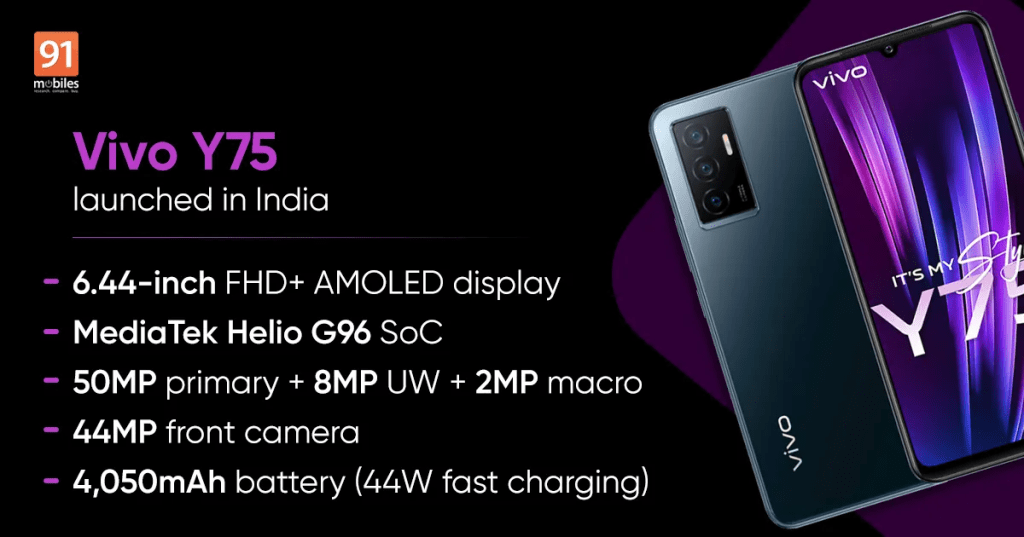
The new Y75 comes with a 6.44-inch 1080×2400 AMOLED screen with a 60 Hz refresh rate, the MediaTek Helio G96 SoC at the helm, and 8GB of RAM, 128 GB of expandable storage

After earlier announcing the Vivo Y75 5G officially, the company has finally also unveiled the 4G variant of the Android smartphone.

  • Vivo Y75 price in India, availability

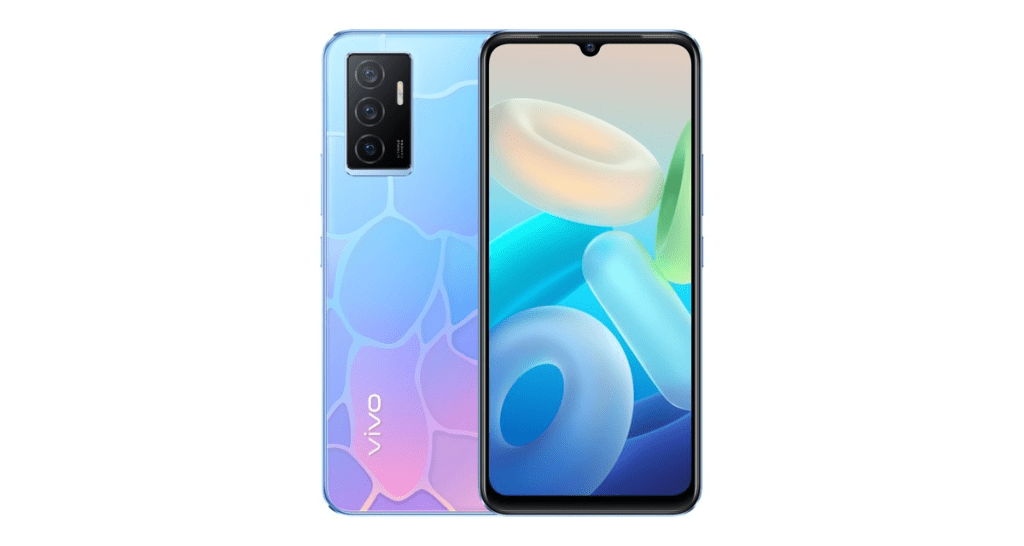
The price of Vivo Y75 in India has been set at Rs. 20,999 for the sole 8GB RAM + 128GB storage variant. The phone comes in Dancing Waves and Moonlight Shadow colors and is now available for purchase through Flipkart, Vivo E-Store as well as offline retail stores.

Customers purchasing the smartphone using cards of ICICI, SBI, IDFC First Bank and OneCard can avail up to Rs. 1,500 discount as well.

  • Vivo Y75 specifications

The dual-SIM (Nano) Vivo Y75 runs on Funtouch OS 12, based on Android 11. The smartphone sports a 6.44 inch full-HD+ (1,080×2,400 pixels) AMOLED display. The Vivo Y-series phone is powered by a MediaTek Helio G96 4G SoC under the hood, paired with 8GB of RAM. The RAM can be extended up to 4GB using the additional inbuilt storage.

For optics, there is a triple rear camera setup along with a rear flash. The camera unit houses a 50-megapixel primary sensor with an f/1.8 aperture, an 8-megapixel wide-angle depth sensor with an f/2.2 aperture, and a 2-megapixel macro sensor with an f/2.4 aperture. For selfies and video chats, the Vivo Y75 has a 44-megapixel autofocus sensor at the front. The camera unit of Vivo Y75 comes preloaded with a list of camera modes, including ultra-wide night, super macro, portrait mode, live photo and bokeh mode among others. The smartphone has 128GB of inbuilt storage, which can be expanded via a microSD card.

Connectivity options on the Vivo Y75 include Wi-Fi, Bluetooth v5.2, GPS, BEIDOU, GLONASS, GALILEO, 3.5mm headphone jack and a USB Type-C port. Sensors onboard include an accelerometer, ambient light sensor, gyroscope, proximity sensor, and e-compass. The phone also comes with a fingerprint sensor for authentication.

The new Vivo Y75 packs a 4,050mAh battery with support for 44W flash charging via a bundled charger. The Moonlight Shadow colour variant of Vivo Y75 measures 160.87×74.28×7.36mm, while the Dancing Waves variant measures 160.87×74.28×7.41mm. The smartphone weighs 172 grams.

Samsung Galaxy Book2 Pro review

Apart from its ultra-thin waistline and lightweight build, it is the top-notch hardware that the Galaxy Book 2 Pro has going for it

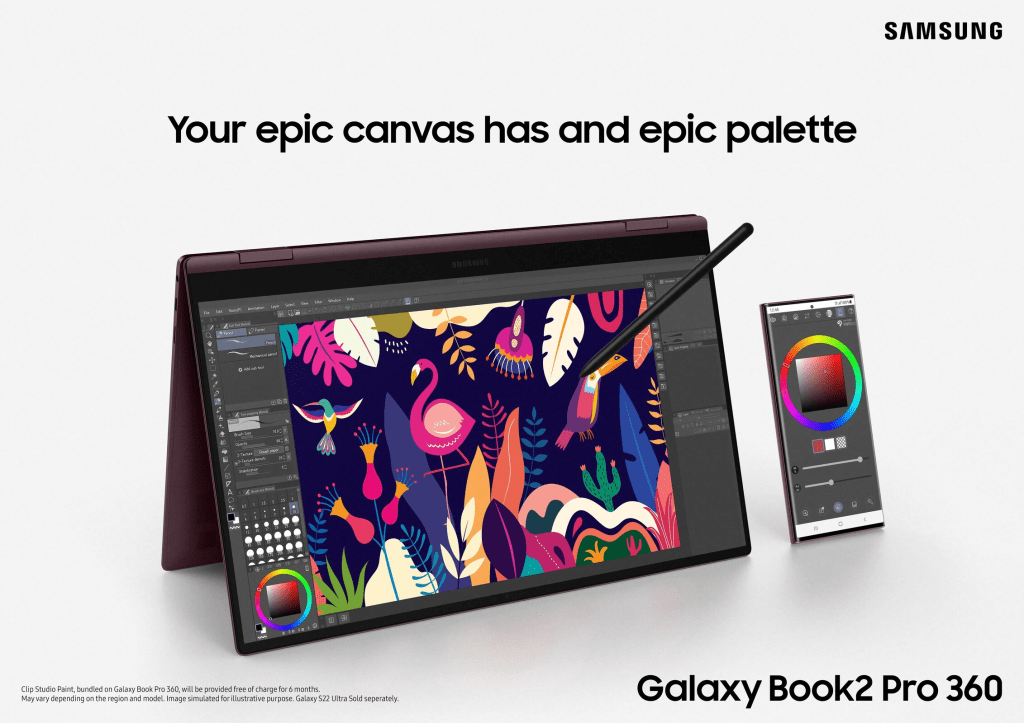
The Galaxy Book 2 Pro is one of the laptops Samsung recently launched as it returned to the India’s PC market. It weighs merely 870 g, which makes it the lightest among laptops in the segment – and even otherwise. Besides, with a waistline of just 11.2 mm, it is also one of the thinnest laptops. Apart from the thin-and-lightweight design, it is the top-notch hardware that the Galaxy Book 2 Pro has going for it. It is among a few laptops in India with Intel’s latest 12th-Gen Core processors (review unit: Core i7-1260P), paired with 16 GB of RAM. The laptop is Intel Evo platform certified with fingerprint scanner for Windows Hello login. It boots the Windows 11 Home operating system loaded with several Samsung apps for comprehensive ecosystem experience, if you have the supported Samsung smartphone, tablet, and audio accessories.

Starting with design, the 13.3-inch screen variant (review unit; there is also a 15.6-inch screen variant available) of the Galaxy Book 2 Pro has ergonomics similar to a high-end tablet with keyboard cover attached. It is a portable laptop that is easy to carry around and convenient to use. Speaking of convenience, the Galaxy Book 2 Pro has most of the ports one uses on a regular basis – 1 x HDMI, 1 x Thunderbolt 4, 1 x USB-C, 1 x USB 3.2, 1 x microSD card reader, and 1 x headphone out/mic-in combo jack. That said, the Galaxy Book 2 Pro seems to be designed on the principle of ‘form follows function’ and not ‘form over function’

Watch Samsung Galaxy Book2 Pro Unboxing

Complementing the form factor is the 13.3-inch fullHD+ AMOLED screen of the Galaxy Book 2 Pro. It stretches on all sides, leaving minimal display bezels. However, the screen has a conventional 16:9 aspect ratio that leaves a sizable bezel on the bottom side. A 16:10 aspect ratio screen would have been a better fit here from both design and utility perspective, but it is what it is. Nevertheless, the screen is good. It is bright, thus, easy to read in bright outdoor conditions, and has an anti-glare film to reduce external light reflections for a comfortable experience. The screen is HDR compliant and boasts excellent contrast, both of which make a noticeable difference in everyday use, especially while watching videos. Moreover, the system-wide dark mode works better here simply because whites and blacks appear as they should – thanks to wide colour coverage of a 10-bit screen panel.

On top of the screen, in a thin display border, the Galaxy Book 2 Pro has its 1080p resolution camera. Powered by Samsung Studio mode, this camera is a delight to use for video conferencing purposes. The Samsung Studio mode supports most of the video conferencing platforms. It enables background effects, artificial face enhancements, and auto framing even on platforms that do not natively support.

It is easy to use and works well.

As for the audio, there are two bottom firing stereo speakers with Dolby Atmos. The speakers output is good and balanced, but their overall loudness is on the muted side. Therefore, they are unusable in environments with loud ambient noise. For the input, there are two front facing microphones. They are good but ultra-sensitive. Thanks to built-in noise cancellation tech, the microphones work best in most environments — insulated or loud ambient noise.

Coming to the keyboard, the Samsung Galaxy Book 2 Pro has a full-sized backlit one with well-spaced distance between keys and modest key travel for tactile feedback. It does not take much time to get comfortable with the keyboard because Samsung did not tinker with its layout, and for better. Likewise, the touchpad is comfortable to use. It is modestly sized and supports Windows 11 gestures.

With regard to performance, the Samsung Galaxy Book 2 Pro has no issue except thermals. It handles most tasks well, but warms up significantly on the bottom side even when used for basic operations. Therefore, the laptop needs constant breaks to work optimally. Otherwise, it starts to throttle the performance. That said, the Galaxy Book 2 Pro is capable of handling power tasks, be it processor or graphics intensive. However, due to thermal issues, it makes a better supplementary device and an underwhelming primary laptop for graphics and processor intensive jobs.

Compensating for the thermal issues is an excellent on-battery and charging time. As a supplementary device used for basic everyday tasks such as intermittent video conferencing, writing, browsing web, etc. the laptop’s battery easily lasts around a week. As a primary device used extensively for almost everything, the battery keeps up for one full day on a single charge. Charging time is quick and the supplied USB-C charger (65W) takes around two hours to power up the completely drained-out battery.

Samsung Galaxy Book 2 Pro: Specifications

Screen: 13.3-inch fullHD AMOLED, 60Hz, 16:9 aspect ratio

Audio: AKG-tuned stereo speakers with Dolby Atmos

Storage: 512GB SSD

RAM: 16GB LPDDR5 (soldered)

Processor: 12th Gen Intel Core i7-1260P

Operating system: Windows 11 Home

Connectivity: Bluetooth 5.1, Wi-Fi 6E (Gig+), 802.11 ax 2×2

Colour: Silver

Priced: Rs 1,14,990

Verdict

The Samsung Galaxy Book 2 Pro is a modestly priced Windows 11 laptop. It punches above its weight in terms of design and performance, yet leaves one asking for more due to thermal issues. Important to note, thermal issues are prevalent in the thin-and-light laptop category, especially those powered by 11th and 12th Gen Intel Core processors and the Galaxy Book 2 Pro is no exception. On other parameters, the Galaxy Book 2 Pro not just meets expectations but also exceeds in some cases. It has a sturdy build, dazzling screen, good backlit keyboard and touchpad, host of I/O ports, and top-notch connectivity.

Sony Bravia X80K smart TV Launched: Details here

Expanding its smart TVs portfolio, Sony on Friday launched its X1 4K HDR Picture processor powered Bravia X80K TVs in India

With an aim to expand its smart TVs portfolio, Sony India on Friday launched a new Bravia X80K TV that comes with X1 4K HDR Picture Processor.

Priced at Rs 94,990, the newly launched TV comes with a TRILUMINOS Pro display that is said to reproduce a life-like color experience.

“The new X80K series takes vision and sound to the next level and offers a world of entertainment with Google TV, brought to life in beautiful color by the realism of our picture and sound technology,” the company said in a statement.

Sony mentioned that users can experience supreme picture and sound in every environment with ambient optimization and sound optimization technology.

The new Sony Bravia TV also comes with Dolby Vision and Dolby Atmos.

Users can also transform their gaming experience with HDMI 2.1 compatibility, Auto Low Latency Mode (ALLM), Auto HDR Tone Mapping and Auto Genre Picture Mode, the company said.

The TV also has Google TV voice search option powered by Google Assistant to offer endless entertainment and works seamlessly with Apple AirPlay 2 and HomeKit.

Earlier this month, the company launched a new X75K TV series that is available in 165 cm (65-inch), 140 cm (55-inch), 126 cm (50-inch) and 108 cm (43-inch).

TikTok plans to push app into gaming

TikTok, which is owned by China’s ByteDance, also plans to roll out gaming more widely in Southeast Asia

TikTok has been conducting tests so users can play games on its video-sharing app in Vietnam, part of plans for a major push into gaming, four people familiar with the matter said.

Featuring games on its platform would boost advertising revenue as well as the number of time users spend on the app – one of the world’s most popular with more than 1 billion monthly active users.

Boasting a tech-savvy population with 70 percent of its citizens under the age of 35, Vietnam is an attractive market for social media platforms such as TikTok, Meta Platfor­ms’s Facebook, and Alphabet’s YouTube and Google.

TikTok, which is owned by China’s ByteDance, also plans to roll out gaming more widely in Southeast Asia, the people said.

That move could come as early as the third quarter, said two of them. The sources declined to be identified as the information has yet to be publicly disclosed.

A TikTok representative said the company has tested bringing HTML5 games, a common form of minigame, to its app through tie-ups with third-party game developers and studios such as Zynga. But it declined to comment on its plans for Vietnam or its broader gaming ambitions.

“We’re always looking at ways to enrich our platform and regularly test new features and integrations that bring value to our community,” the representative said.

Nord Buds review: OnePlus has got the formula right for budget earphones

At this price, OnePlus Nord Buds are the best offering in the range. They may not beat others in features, but they certainly do so in quality

Over the years, OnePlus has developed a reputation for itself as the game changer. With its first phone, it brought down the price of flagship offering and gave tough competition to the likes of Samsung and Apple. It has been following the same strategy with regards to its earbuds.

The Z range did not do justice to the OnePlus name, but with its new Nord Buds, it is all set to upend the market.

Design

While most smartphone makers are making an attempt to make things smaller, Nord Buds try to go other way. With the big earring box design, the buds are certainly not an easy carry in pockets. The quality of the plastic is cheap, given the price, but the case follows design patterns from its established peers. There is a connect button in the back and an indicator light upfront. The earphones themselves are not small by any accord. There is a long flat stem that attaches itself to what can some ascribe an Airpods Pro like design. The tips are not as comfortable, as one would want them to be and there is a good chance you may drop them with rigorous exercise.

Sound and call quality

This is where the Nord Buds trump the competition. The audio signatures can match some of the best earphones in the mid-range segment. The sound signature can handle high bases very well, lows, however, are a problem. There is enough bass to get your through peppy numbers.

I listened to “Always Remember Us This Way” from A Star is Born and the speakers could handle the mids and highs very well. There is distortion at top volume, but the price is a problem. The beginning of “Firestone” by Kygo was barely noticeable, so that’s a problem. The audio leak was too much at volumes higher than 80 per cent. The person sitting next to you would know what you are listening to.

Call quality was bad, the audio in was not so much of a problem, but the output was robotic. Not something you would want or expect in 2022. The ambient noise was also too high.

User experience

The touch panel, at the back of each earphone, is too sensitive for operation. In lower end earphones, buttons would work better. Although Bluetooth worked fine, connection issues remained, especially to devices other than OnePlus. The sound signature with OnePlus was better as well. The Bluetooth would not disconnect, even in OnePlus at times it would take time to reconnect. So, there are a lot many software issues that need to be resolved.

Price

At Rs 2,799 there is little you can expect, but Nord Buds beat the competition, at least in terms of sound quality and depth.

Design a site like this with WordPress.com
Get started